Pages

Sep 1, 2010

What Every Photographer Needs to Know about Social Media

What Every Photographer Needs to Know about Social Media: "

An introduction to social media for photographers by Australian Freelance Photographer Gemma Carr (@GemTweetAlot).


How critical is social media/marketing to your photography business?


Photographers are busy people. So too are our clients. More so than ever before we have an abundance of information available to us at the click of a mouse. It’s always evolving; full of opportunity and at times, a little overwhelming.

social media photographers


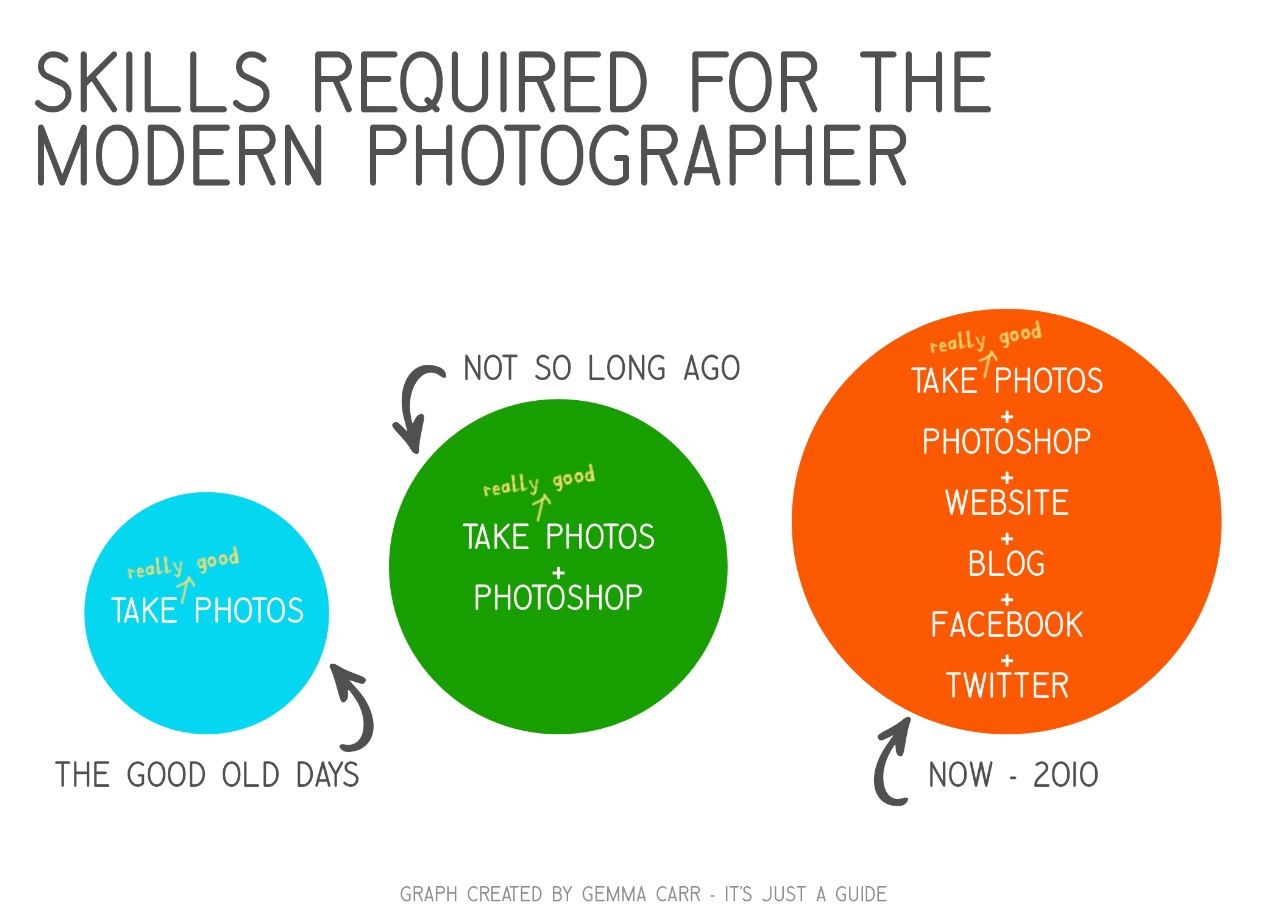
As you can see, the modern day photographer is a busy one indeed. Running a successful photography business has always been about much more than just taking great photos.


As shown in the diagram above, the skills we need as a photographer in 2010 are much more diverse. The list could go on, but, I think you will see the most notable change in skills is the web?based tools such as website/Blogs/Facebook/Twitter.


And with all the new ways to promote your business the range of options is both exciting and challenging. Wouldn’t you agree?


Which social media/marketing tools are right for you?


This is a very personal decision; it’s about finding the right fit for you, your brand and your clients. Often a combination of your preferred tools works really well.


About one year ago, I euthanised my Facebook account. A bold act at the time when I was so heavily entrenched in it, but certainly a move I have not regretted.


About one year ago I set up my twitter account. This, I can report has been the most inspirational move I have made in years.


Instead of being in touch with old high school friends (lovely as they are, we lost touch for a reason) I was now immersed in a world that spread outwards to photographers from all over the world. From my home office in Melbourne I am getting creative inspiration, ideas, technical advice and feedback from my photography and industry colleagues that I never once had.


From using Twitter and linking in to dozens of photographers Blogs, I have realized the potential power of the Blog. If utilized right, a Blog is a current, living document of your photography business. In some cases the Blog can supersede a website.


Why Blog?


Simply so that my current and future clients can get to know me… FAST! My Blog is a behind the scenes look into what I do, it’s more personable and friendly than a website. This is key for my wedding & portrait business clients.


For my commercial clients my website is a more formal introduction to me and my photography. In the short time I have had my Blog online, my enquiries have increased significantly.


Acclaimed Perth wedding photographer, Samm Blake, is testament to how well web based marketing can work:


“My entire business was built on my website, Blog, facebook and twitter!”


“My Blog is definitely the most important marketing tool for my business. It allows me to share my most current work and allows me to connect with current, prospective and past clients as well as many other photographers around the world”


Website Vs Blog


In your business, one web tool may outshine the other. Yet, what is so powerful about these available tools is how amazingly well they can compliment each other. I use my website and Blog to differentiate the services I offer. For me is all about


making it easy for people to find and to connect with me.


“Website and Blog are the most important in our business. The websites works as a medium for art directors, designers etc to look you up and see your work so it’s an important overview of your work. The Blog keeps them informed about what your doing and hopefully on their minds when a suitable job comes up. Obviously you need to promote in other ways which direct people to your website otherwise it can sit there being very idle.”


Adair Lander from Adrian Lander, Commercial Photographer, Sydney.


Shouldn’t I just be taking photos?


Whilst all this stuff sounds easy and exciting, most of it equates to a lot of time and personal input from you. All of the time spent at the computer, is time away from your camera. So, if you consider it a chore to participate in social media, then I suggest you don’t.


The inspiration I have gained from being able to connect with fellow creative people has truly taken me by surprise, yet it all falls into step behind me actually shooting.


Top tips for Blogging


  • Content is king – add regular posts that create interest for your viewers

  • Use Twitter & Facebook to attract visitors to your Blog

  • Match your Blog to your branding


Top Social Media Tips


  • Be yourself, share share share! (but not the nitty gritty details)

  • Respond to others; let people know you are alive and kicking (and interested in what’s happening)

  • Don’t try to do too much, just pick the programs that you enjoy using


At the end of the day, regardless of what decade we are in, nothing is has been or will ever be more important than taking really good photographs.


I am excited about my photography career, I hope you are too!


Gemma Carr is a Freelance Photographer from Melbourne. See more from her at her site GemmaCarr.com.au. Follow her on Twitter at @GemTweetAlot. This post was previously published in the members area of ACMP.


Helpful Links:


  • ProPhotoBlogs – add on software especially made for photographers

  • WordPress.com – free software to build your Blog

  • ProBlogger Blog Tips – a usefull resource with everything you need to know about blogging from starting up to maximizing your BLOG’s potential (also a sister site to dPS).


Post from: Digital Photography School - Photography Tips.


dpsbook.png


What Every Photographer Needs to Know about Social Media


"

Jul 13, 2010

Tidy Photo Negative Scanning with Paper Towel or Toilet Paper Tubes

Tidy Photo Negative Scanning with Paper Towel or Toilet Paper Tubes: "

201007130900.jpg

Here’s a clever way to make negative scanning extension tubes out of paper towel or toilet paper tubes using your SLR…

(image via wired)

Read More

Source: Wired via ImagingInsider.com


Film conversion How to convert a 35mm negative into a usable digital image

Wireless DSLR External Monitor for Under $200

Wireless DSLR External Monitor for Under $200: "

Wireless Monitor


Want an affordable way to catch the live view or video feed from your DSLR’s LCD display? Does $200 sound about right?


Download:
FLVMP43GP


The above video is a demonstration by photographer Robert Benson, who hacked together a wireless transmitter and receiver for real time video feed from your DSLR. Such pro-level devices can run in the neighborhood of $4k or so.


“The device, consisting of a transmitter, receiver, color 7″ monitor and additional components, takes the feed that normally appears on the back of your DSLR, and feeds it wirelessly to one or more monitors, which can be used by the art director on a shoot, assistants, or anyone else who wants to see what the photographer is seeing. Sends video or still photos without delay. Don’t have to bump heads anymore trying to show others an image on the small display on back of camera.”


Benson gives a full rundown of how this kit works over on his blog. And, if you like it, he’ll assemble a kit for you and ship it out for $196.


[Robert Benson]

Copyright/DMCA Notice: The RSS entry was originally published on Photography Bay and is protected by copyright laws. It is unlawful to (a) edit, modify, alter, or create derivative works of the text, content or links supplied by Photography Bay, (b) use any robot, spider, scraper, other device or manual process to monitor or copy any content from the Photography Bay RSS feed, (c) sell, retransmit or commercially exploit the Photography Bay RSS feed, headlines or content in any manner except as expressly permitted in writing by authorized representatives of Photography Bay, (d) incorporate advertising into or the placement of advertising associated with or targeted towards the Photography Bay RSS feed or (e) use the Photography Bay RSS feed for any unlawful purpose or in violation of the rights of others. RSSID#794326

"

Jul 6, 2010

In The Bag with Photographer David Burnett

In The Bag with Photographer David Burnett: "

by Grover Sanschagrin


David Burnett, a Washington DC-based photojournalism legend, has been a photo hero of mine since college. Back in my college days, he was always doing something different than everyone else. He was always trying something new, and I was a photojournalism student at Ohio University, and a proud Burnett fan.


A lot has changed since those early days of the late '80s and early '90s. But thankfully, Burnett hasn't - he's still innovating, still experimenting. Still pushing himself to go beyond the typical, the obvious, the routine.


In this really cool installment of 'In The Bag,' I had the privilege of interviewing David Burnett, which gave me the perfect excuse to go looking through his bag. There should be no surprise that its loaded up with gear that helps to keep his creative energies flowing, his options open, and his innovation as impressive today as it was in my college days.


"

Video :: Canon’s Thought Provoking “Wonder Camera Concept”

Video :: Canon’s Thought Provoking “Wonder Camera Concept”: "

Canon recently showed a “Wonder Camera Concept” at World Expo 2010…


Download:
FLVMP43GP


===


ImagingInsider.com


"

Jun 30, 2010

ImageRights International offers free service

ImageRights International offers free service: "

This is a press release from the guys at ImageRights International, via our friends at Matternow… It’s fair to say that you guys don’t often like press release posts like this one, but I think this one may be something very useful to a lot of us!


**update** I can confirm this service works, as advertised, I did a sneaky test involving “borrowing” one of the co-founder’s photographs from his website and posting it on my blog, he had emailed me in no time to tell me I was “sprung” — I’ve signed up! –Sime


Press Release


ImageRights International offers free service to help professional photographers identify digital image theft


Powerful visual search technology detects photo copyright violations, stock photo piracy


CAMBRIDGE, Mass. June 29, 2010 ImageRights International, Inc., a company that helps professional photographers and illustrators discover the illegal use of their intellectual property on the Web, is offering a free version of its online image recognition and recovery service to further expand efforts against image piracy.


With this new offering, the company’s advanced visual search and crawler technology will continuously scan websites and blogs to protect up to 10,000 images for professional photographers and illustrators. The crawler indexes millions of new images every month and uses powerful image recognition technology to compare customers’ photos and illustrations against images found on the Web. It then detects where the customers’ images have been used, even if the stolen photos have been altered, cropped, rotated or color adjusted. The customer receives a full report, including a picture of the original image, its use online, and the URL and ownership information for the website where it was found.


“As an advocate for photographers and illustrators, our goal is to help artistic professionals monitor how their work is being used on the Internet, and to partner with them to recoup lost profits when it’s being used illegally,” said Maria Kessler, senior vice president of business development at ImageRights and former president of the Picture Archive Council of America (PACA). “Image piracy is rampant online and by making these services more accessible, we’re enabling creatives to have more control over how their images are used, while sending a clear message that we are patrolling for unauthorized uses.”


Customers who take advantage of ImageRights’ free service may also participate in the company’s new, optional Recovery Program, which will launch next month to help photographers and illustrators obtain compensation for the unauthorized use of their images.


ImageRights will continue to offer its Basic, Standard and Pro packages for a monthly fee of $9.95, $19.95 and $39.95, respectively. Customers who select a paid program and opt into the Recovery Program will share 35 percent of their recovered fees with ImageRights; those who select the free service will share 50 percent of their compensation. Users are welcome to opt out of the ImageRights’ Recovery Program to pursue compensation on their own or with the help of their own attorney.


For information about ImageRights or to create your free account and start uploading your images now, go to www.imagerights.com


About ImageRights International


ImageRights International protects professional photographers and illustrators’ intellectual property online by identifying illegal use of images and providing a support system to receive proper compensation. With its industrial strength crawler technology continuously scanning business sites, blogs, news/media sites and more, ImageRights works as an agent to support proper compensation for image use. Founded in 2008, ImageRights International is a global company headquartered in Cambridge, Mass. It is a proud member of the APA (www.apanational.com), CEPIC (www.cepic.org), and PACA (www.paca.org).


Post from: Digital Photography School - Photography Tips.


dpsbook.png


ImageRights International offers free service


"

Extreme ISO Settings With the D3s, 1D Mark IV and Lightroom 3

Extreme ISO Settings With the D3s, 1D Mark IV and Lightroom 3: "


I’ve been digging into Lightroom 3 for a couple of days now. I’m a big fan of the improvements – happy to see my video files, love the tethered shooting capability, as well as the improved speed. Last night, however, I decided to dig up some of my photos from the Canon 1D Mark IV and Nikon D3s ISO comparisons and take a closer look at the improved noise control that we’ve all heard so much about.


While I experienced a taste of what was to come in the Lightroom 3 beta, I was not prepared for the magnitude of improvement that I saw in the images as I wiped my Lightroom 2 adjustments and made new adjustments in Lightroom 3’s noise control panel.


I could go on and on about it, but you really need to see for yourself.


Here’s a shot from the Nikon D3s at ISO 25,600 processed in Lightroom 3:


I chose to look in close at images at ISO 6400, ISO 12800 and ISO 25600. You can see the center portions of each image cropped to 100% view in the comparisons below.


You can download the full-res file (for personal use and inspection only) by right-clicking any of the links below the respective images and choosing “Save link as…” from your menu.


Canon 1D Mark IV vs. Nikon D3s – ISO 6400


As you can see, the Lightroom 3 file trounces everything else – and somehow Adobe still manages to hold onto plenty of detail. And this is ISO 6400 . . . at night.


Original Files


Nikon D3s Default JPEG file

Nikon D3s ViewNX NEF Conversion


Nikon D3s Lightroom 3

Nikon D3s Lightroom 2 +50 Luminance Noise Reduction


Canon 1D Mark IV Default JPEG file

Canon 1D Mark IV DPP CR2 Conversion

Canon 1D Mark IV Lightroom 3

Canon 1D Mark IV Lightroom 2 +50 Luminance Noise Reduction


Canon 1D Mark IV vs. Nikon D3s – ISO 12800


Original Files


Nikon D3s Default JPEG file

Nikon D3s ViewNX NEF Conversion


Nikon D3s Lightroom 3

Nikon D3s Lightroom 2 +50 Luminance Noise Reduction


Canon 1D Mark IV Default JPEG file

Canon 1D Mark IV DPP CR2 Conversion

Canon 1D Mark IV Lightroom 3

Canon 1D Mark IV Lightroom 2 +50 Luminance Noise Reduction


Canon 1D Mark IV vs. Nikon D3s – ISO 25600


Original Files


Nikon D3s Default JPEG file

Nikon D3s ViewNX NEF Conversion


Nikon D3s Lightroom 3

Nikon D3s Lightroom 2 +50 Luminance Noise Reduction


Canon 1D Mark IV Default JPEG file

Canon 1D Mark IV DPP CR2 Conversion

Canon 1D Mark IV Lightroom 3

Canon 1D Mark IV Lightroom 2 +50 Luminance Noise Reduction


Additionally, I went ahead and processed images at ISO 51200 and ISO 102400 for the sake of comparison. Below are web-sized samples at these extreme settings, and you can see the full-size images by right-clicking on each image and choosing “Save link as…”


Nikon D3s at ISO 51200 in LR3


Nikon D3s at ISO 102400 in LR3


Canon 1D Mark IV at ISO 51200 in LR3


Canon 1D Mark IV at ISO 102400 in LR3


While these images at ISO 6400 and above are extreme examples from two state of the art DSLRs, the processing power in Lightroom 3 will push any other RAW files to the next level as well. And, granted, the ISO 51200 and ISO 102400 are more of spec lines than anything else (but the D3s still weighs in pretty respectable at ISO 51200). Finally, I still think that ViewNX and Canon DPP hold detail pretty darn well (especially ViewNX), but neither deal with noise in as smooth of fashion as Lightroom 3 does.


The bottom line is that if you shoot weddings, events or other low-light situations, this capability of Lightroom 3 should be reason enough to get the software, or to upgrade if you are still using Lightroom 2.


You can get Lightroom 3 direct from Adobe, or trusted online retailers like B&H Photo.

"